Audio file player and editor for Mac
Listen to, check, and fix audio files in Finder
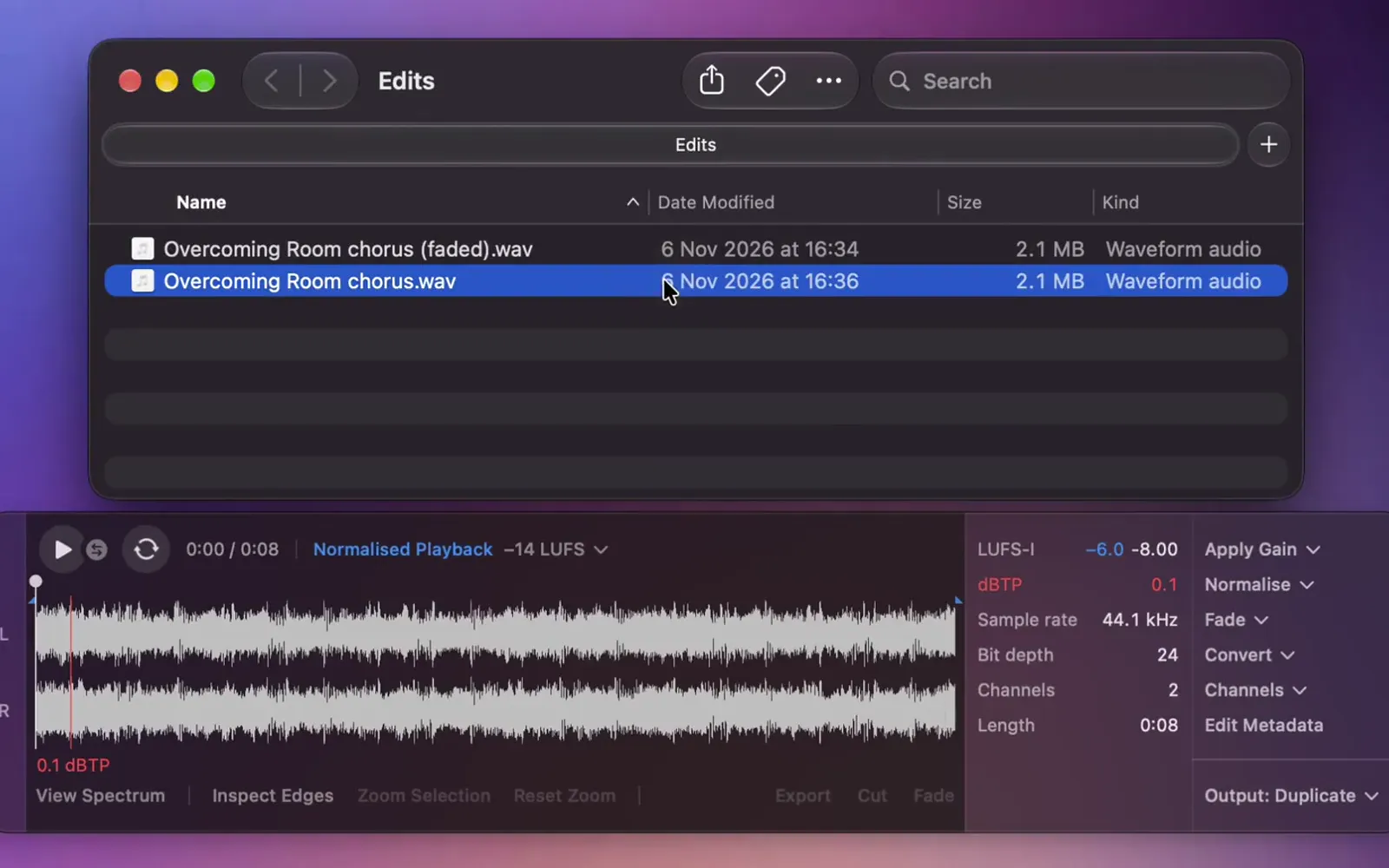
Select a file in Finder and Wavefile is ready to play, measure and edit it, stereo or Atmos. No need to import or export
- Trim, fade and cut files without leaving Finder
- A/B mix versions without a glitch, stereo or Atmos
- Measure loudness and true peak before delivery
Not on your Mac right now? Start it here and we'll email you the download link.
Paid once, no subscription · Mac only Launch price until 31 December. Want it on Windows?
Without Wavefile, every small job opens a DAW
-
Making a quick edit
Trimming a click, fading out a tail or cutting a bar means opening a DAW, importing the file, editing and bouncing it again.
-
Comparing versions
You line up every mix in a session, match their levels and solo between tracks. An Atmos version needs a renderer routed in as well.
-
Checking an Atmos master
To hear a 7.1.4 bounce or an ADM master, you open a renderer or a DAW session and route it, just to check one file.
-
Checking before delivery
You meter each file in a plugin, one at a time, and find the one that's off spec after it's been sent.
So a two-second fix takes five minutes, and gets put off.
What Wavefile does instead
Quick edits, right in Finder
Select a region and set its edges to the sample, draw fades and hear them as you drag, then Cut or Export. The new file appears beside the original.

A/B mix versions without a glitch
Set Autoplay to Continue and arrow through the versions in Finder. Each takes over from the same moment, at the same loudness, so you hear only what changed, in stereo or in Atmos.

Check an Atmos master on headphones
Select a 7.1.4 file or an ADM master and hear it in spatial audio straight away, with ADM rendering to 7.1.4 while you listen. Choose Apple’s Spatial Audio or a stereo fold-down on headphones, and on a speaker rig each channel goes to its own output.

Measure before you deliver
Loudness and true peak appear as each file loads, and a batch shows them all in one table, with overs in red. Normalise one file or forty to spec, and the new files appear beside the originals.

Not on your Mac right now? Start it here and we'll email you the download link.
Launch price until 31 December. Paid once, no subscription.
Also in Wavefile

Drag clips into your DAW
Select a region and drag it into Finder or straight onto a DAW track. It lands as a new WAV file at the original’s bit depth, and the original is untouched.

Every format the job asks for
WAV, AIFF, FLAC, Apple Lossless, AAC and MP3, sample-rate conversion, and multichannel split and merge up to 9.1.6.

Hear it as streaming will
Normalised Playback plays every file at a streaming target, such as Spotify’s −14 LUFS, so you hear a master as listeners will and the louder file stops sounding better.

See the spectrum
View Spectrum shows how a file’s frequency content changes over time, channel by channel, in place of its waveform.

Show it only when you ask
Have Wavefile appear only when you press a shortcut in Finder, such as ⌃⇧W, or a modified click, rather than whenever you select an audio file.

Run a whole delivery spec at once
Wavefile adds actions to Apple Shortcuts: normalise, gain, fade, sample rate, save and measure. Chain them into a spec and run it on the files you select, from Finder’s Quick Actions or a keyboard shortcut.
Before you try it
Why not just use Quick Look?
Will it change my original files?
Why does it need Accessibility and Finder Automation?
Can it play Atmos files?
What happens when the trial ends?
Try it on your own files
Trim and fade files in Finder, A/B your mix versions in stereo or Atmos, and check every file before it goes out. If you buy it and change your mind, you have 14 days to ask for a refund.
Not on your Mac right now? Start it here and we'll email you the download link.
Launch price until 31 December. Paid once, no subscription. Made by Tim, formerly of Sonnox and Focusrite.
Details
| Reads | WAV, AIFF, CAF, FLAC, M4A and MP3, stereo to 9.1.6 and ADM. With Scan video files on, the audio in MOV, MP4 and M4V too. |
|---|---|
| Writes | WAV, AIFF, CAF, FLAC, Apple Lossless, AAC and MP3 |
| Requires | macOS 14 Sonoma or later |
| Works in | Finder. It follows Finder’s selection, so not Open and Save dialogs or other file browsers. |
| Licence | One licence for up to 3 of your Macs. It needs the internet only to activate or deactivate a Mac, so going offline never locks you out. Your licence key arrives by email. |